MeasureFloorPlan
8,800+ floor plans measured in 130+ countries

Drywall Takeoff Software

Wall and ceiling areas per room converted to drywall sheets with waste, from one plan upload.

JPG · PNG · PDF · HEIC

Free live demo No signup required Refund if it can't measure your plan

Drywall Takeoff From the Plans You Already Have

A drywall takeoff is wall area plus ceiling area, turned into sheets. Upload the plan, set the scale from one dimension and the ceiling height, then click each room. The table shows wall and ceiling area per room, and the drywall takeoff converts them into sheet counts for 4x8, 4x10, or 4x12 board with a waste percentage you set. Enter material and labor cost per square foot to price the job, then export everything to CSV for your bid.
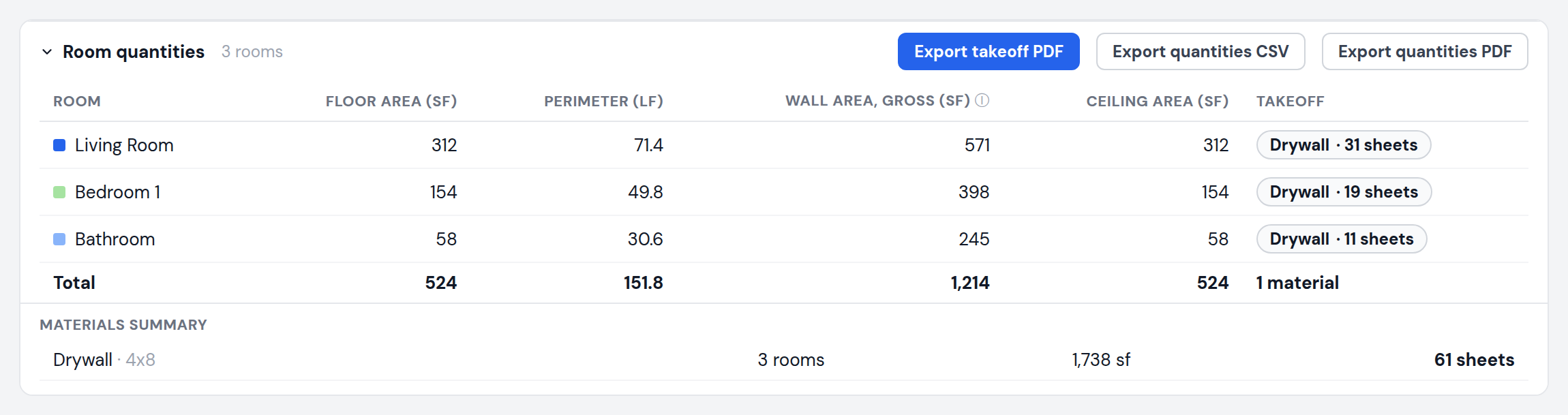
Drywall takeoff table converting wall and ceiling areas into sheet counts per room with a materials summary

What You Get for Drywall Takeoff

Everything below comes from one plan upload, in your browser.

Wall area (perimeter times ceiling height) and ceiling area per room

Sheet counts for 4x8, 4x10, and 4x12 board

Waste percentage you set (default 10%)

Sheets round up per room

Material and labor cost per square foot

CSV and PDF export with a materials summary

No software to install. Works on Mac and PC.

How Drywall Takeoff Works

From plan to numbers in three steps.

1

Upload the plan

PDF, JPG, or PNG. Architect sets, builder plans, and scanned drawings all work.

2

Set scale and ceiling height

Calibrate from one printed dimension, then enter the ceiling height used for wall area.

3

Click rooms, apply drywall

Each room becomes a row. Apply the drywall takeoff to every room at once, pick the sheet size and waste, and export.

Works With the Plans You Already Got

Use a PDF or image export from any of these programs, drop it in, and start measuring.

Architecture & CAD

MeasureFloorPlan works with AutoCAD plans
MeasureFloorPlan works with Revit plans
MeasureFloorPlan works with Chief Architect plans
MeasureFloorPlan works with ArchiCAD plans
MeasureFloorPlan works with SketchUp plans
MeasureFloorPlan works with Vectorworks plans
MeasureFloorPlan works with SoftPlan plans

Scans & floor plan apps

MeasureFloorPlan works with Matterport plans
MeasureFloorPlan works with iGUIDE plans
MeasureFloorPlan works with CubiCasa plans
MeasureFloorPlan works with magicplan plans
MeasureFloorPlan works with RoomSketcher plans
MeasureFloorPlan works with Apex Sketch plans
MeasureFloorPlan works with Zillow plans

Simple Pricing

Try the free demo first. Pay per plan, by the day, or by the month. No annual contract.

Single plan

$9per plan

One floor plan from upload to export, every format included.

Day Pass

$1524 hours

Unlimited plans for a day. Good for a bid with a full plan set.

Pro

$29per month

Unlimited plans and exports, saved projects, cancel anytime.

JPG · PNG · PDF · HEIC

Teams of 3 can share one $49 per month bill. See all plans

Frequently Asked Questions

Common questions about drywall takeoff with MeasureFloorPlan.

How does it count drywall sheets?

Wall area plus ceiling area for the room, plus your waste percentage, divided by the area of the sheet size you pick (32 sq ft for 4x8, 40 for 4x10, 48 for 4x12). Counts round up per room.

Are door and window openings deducted?

No. Wall area is gross, perimeter times ceiling height. Many drywall estimators leave openings in to cover waste and offcuts. If you net them out, subtract them from the total.

Can I skip ceilings?

The table lists wall and ceiling area separately, so you can bid walls only from the wall column. The sheet count in the drywall takeoff covers both surfaces.

Does it handle multi-floor plans?

Yes. Each level gets its own scale, and the totals row adds up every room on every level.

Related takeoff tools

Area Takeoff SoftwarePainting Estimating SoftwarePDF Plan Takeoff Software

Measure Your Floor Plan in Minutes

Measure lengths and areas on any floor plan so you can quote jobs and order materials, fast.

Upload Floor Plan