Floor Takeoff Software
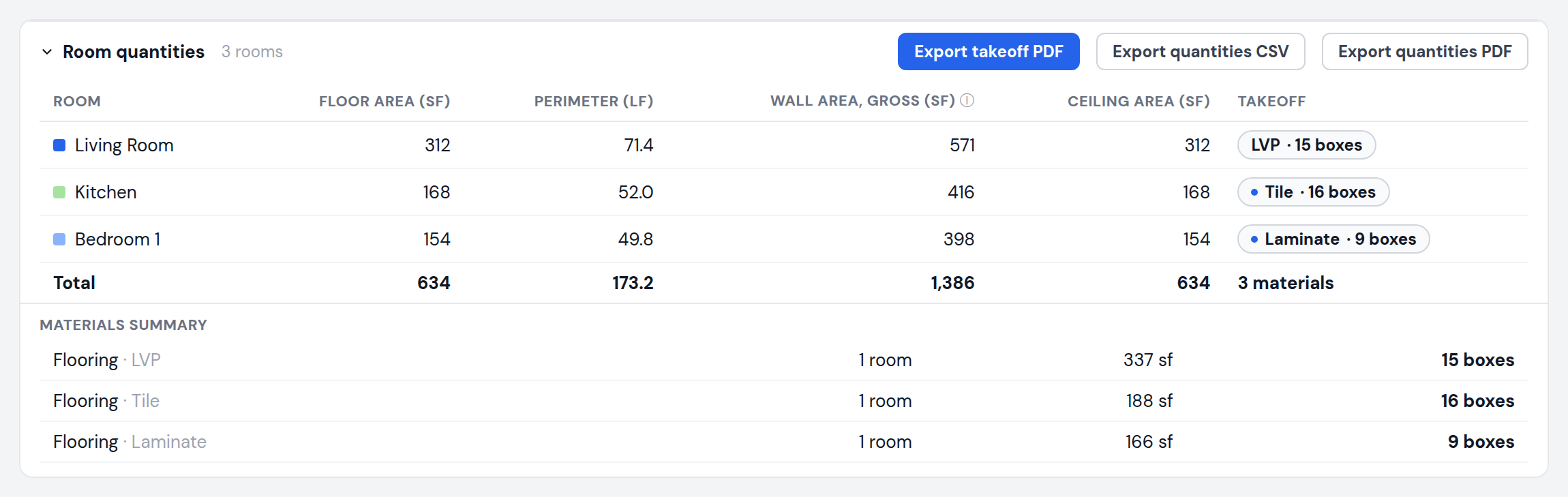
A flooring estimate starts with two numbers per room: floor area and perimeter. MeasureFloorPlan measures both for every room on the plan, keeps them in one table with the room names you assign, and exports the whole thing to CSV so the quantities drop straight into your estimate spreadsheet. Add the flooring preset and each room also shows boxes to buy: pick the material, box coverage, and lay pattern, and waste is applied per room. No printed plans, no scale ruler, no desktop takeoff suite.
Upload a PlanRuns in your browser. Nothing to install.
How it works
- 1Upload the plan. PDF or image, at any size a floor plan normally arrives in.
- 2Set the scale once. One known dimension calibrates the whole plan. Multi-floor plans keep a separate scale per level.
- 3Trace and export. Click each room, pick a flooring material if you want box counts, rename rows to match your estimate, and export the table to CSV or PDF.
What you get
- Floor area and perimeter per room, plus wall and ceiling areas
- Flooring preset: LVP, laminate, engineered, or tile with box coverage and pattern waste
- Boxes round up per room, the way flooring is actually bought
- Rename rooms inline so rows match your estimate lines
- Cutouts (stairwells, chases) net out of floor area
- Totals row across every room and level
- CSV opens directly in Excel or Google Sheets
Pricing
No install, and a free demo on the homepage to try first. Plans are $9 each, $15 for a 24-hour Day Pass with unlimited plans, or $29 per month for unlimited. Teams of 3 share a $49 per month bill.
Frequently asked questions
What columns does the CSV have?
Room name, floor area, perimeter, gross wall area, and ceiling area, one row per room, plus a totals row. With a material preset set, quantity and cost columns join the sheet. Units follow the on-screen unit mode.
Can it estimate flooring boxes?
Yes. Choose the material and lay pattern, confirm the box coverage in sq ft, and each room shows boxes to buy with waste applied. Rooms round up individually, matching how flooring is purchased per room.
Can I name the rooms?
Yes. Click any room name in the table to rename it, and the CSV uses your names.
Does it handle openings in the floor?
Yes. The cutout tool subtracts stairwells and other openings from the room that contains them.
Related takeoff tools