Quick Measure Takeoff Tool
Full takeoff suites earn their keep on commercial work and punish you on everything smaller. When the job is a house, a remodel, or a single tenant space, you need quantities, not a CAD environment. MeasureFloorPlan is the quick version: upload the plan, calibrate the scale with one known dimension, click each room, and the quantities table is done. If the bid needs materials too, pick a preset once and it applies to every room: boxes, sheets, or gallons alongside the areas. Most plans take a few minutes to trace.
Upload a PlanRuns in your browser. Nothing to install.
How it works
- 1Upload. Drag the plan in as PDF, JPG, or PNG. It renders immediately in the browser.
- 2Calibrate. Click both ends of one known dimension and type its length. That single input scales the whole plan.
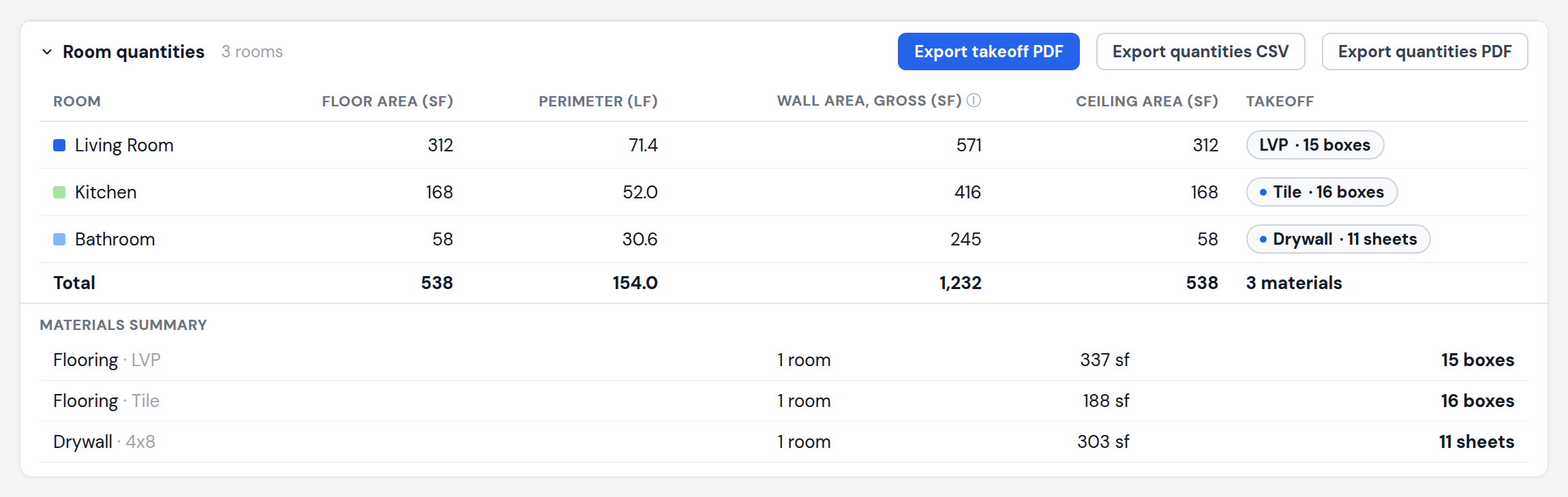
- 3Click rooms. Each traced room becomes a table row with floor area, perimeter, wall area, and ceiling area.
What you get
- Three steps from upload to quantities
- One-pass materials: set flooring, drywall, paint, or trim once for all rooms
- No CAD experience needed, no training time
- Keyboard shortcuts for tracing once you are fast
- Free demo to try before you pay
- CSV and PDF export when you need the deliverable
Pricing
No install, and a free demo on the homepage to try first. Plans are $9 each, $15 for a 24-hour Day Pass with unlimited plans, or $29 per month for unlimited. Teams of 3 share a $49 per month bill.
Frequently asked questions
How long does a plan take?
Setting the scale takes under a minute and each room is a few clicks. Most residential plans are fully traced in a few minutes.
Can I get material counts too?
Yes. Pick a material preset once and it applies to every room, converting areas into boxes, sheets, or gallons. Any single room can be switched to a different material afterward.
Do I need takeoff or CAD experience?
No. If you can identify one known dimension on the plan and click around a room, you can produce the table.
What if the plan has no scale bar?
Use any labeled dimension, or a standard element like a 3 ft door. You choose what to calibrate from.
Related takeoff tools