MeasureFloorPlan
8,800+ floor plans measured in 130+ countries

Concrete Takeoff Software for Slabs and Footings

Slab areas and footing lengths from the plan, ready to turn into cubic yards.

JPG · PNG · PDF · HEIC

Free live demo No signup required Refund if it can't measure your plan

Concrete Takeoff From the Plans You Already Have

Concrete is bid by volume, and volume starts with two measurements from the plan: slab area and footing length. Upload the foundation or floor plan, set the scale from one dimension, and trace each slab or pour as an area. Use the Distance tool along footings, grade beams, and curbs for linear feet. Every area and length lands in a table with totals and exports to CSV. Multiply by thickness to get cubic yards: square feet times slab thickness in inches, divided by 324.
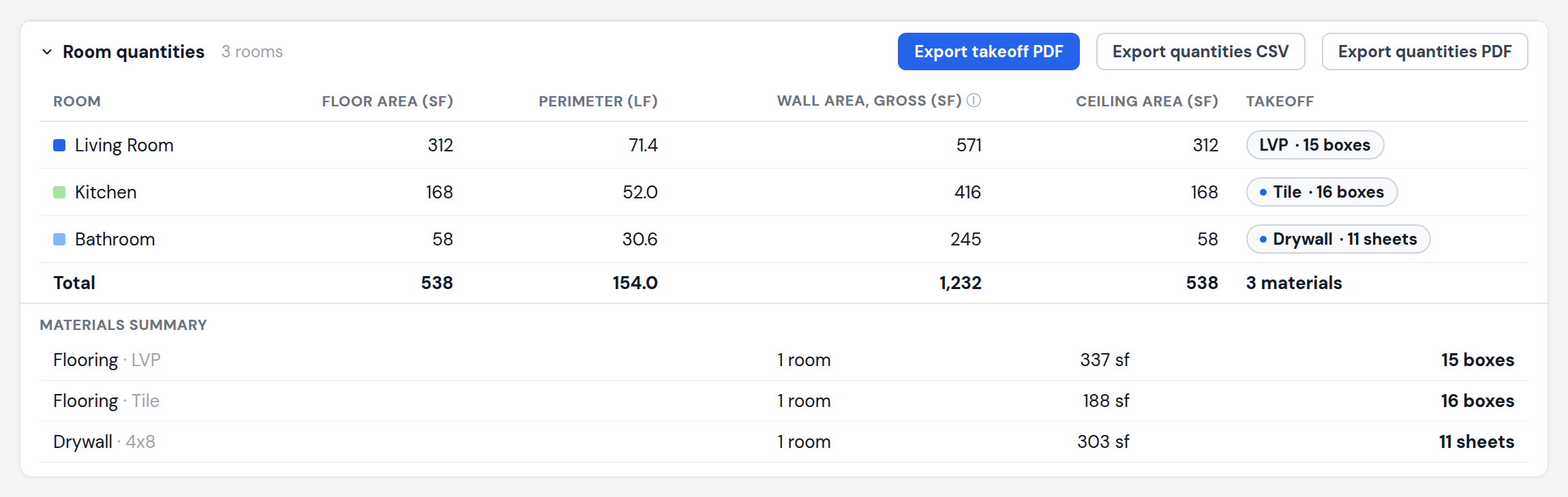
Quantities table listing measured areas and perimeters with totals and CSV export

What You Get for Concrete Takeoff

Everything below comes from one plan upload, in your browser.

Area per slab or pour, with perimeter for edge forms

Linear feet of footings, grade beams, and curbs with the Distance tool

Cutouts to subtract pits, penetrations, and blockouts

Name each area to match your pour schedule

Totals across every area and level

CSV and labeled PDF export

No software to install. Works on Mac and PC.

How Concrete Takeoff Works

From plan to numbers in three steps.

1

Upload the plan

Foundation plans, site plans, or floor plans as PDF, JPG, or PNG.

2

Set the scale

Click both ends of a printed dimension and enter its length.

3

Trace pours and footings

Draw each slab or pour as an area and each footing as a length, then export the table to CSV.

Works With the Plans You Already Got

Use a PDF or image export from any of these programs, drop it in, and start measuring.

Architecture & CAD

MeasureFloorPlan works with AutoCAD plans
MeasureFloorPlan works with Revit plans
MeasureFloorPlan works with Chief Architect plans
MeasureFloorPlan works with ArchiCAD plans
MeasureFloorPlan works with SketchUp plans
MeasureFloorPlan works with Vectorworks plans
MeasureFloorPlan works with SoftPlan plans

Scans & floor plan apps

MeasureFloorPlan works with Matterport plans
MeasureFloorPlan works with iGUIDE plans
MeasureFloorPlan works with CubiCasa plans
MeasureFloorPlan works with magicplan plans
MeasureFloorPlan works with RoomSketcher plans
MeasureFloorPlan works with Apex Sketch plans
MeasureFloorPlan works with Zillow plans

Simple Pricing

Try the free demo first. Pay per plan, by the day, or by the month. No annual contract.

Single plan

$9per plan

One floor plan from upload to export, every format included.

Day Pass

$1524 hours

Unlimited plans for a day. Good for a bid with a full plan set.

Pro

$29per month

Unlimited plans and exports, saved projects, cancel anytime.

JPG · PNG · PDF · HEIC

Teams of 3 can share one $49 per month bill. See all plans

Frequently Asked Questions

Common questions about concrete takeoff with MeasureFloorPlan.

How do I turn slab area into cubic yards?

Multiply the area in square feet by the slab thickness in inches and divide by 324. A 1,000 sq ft slab at 4 inches is 1,000 x 4 / 324, about 12.3 cubic yards, before waste.

Does it calculate concrete volume directly?

No. It measures the areas and lengths. Volume depends on thickness, which you apply with the formula above or in your estimate spreadsheet.

Can I measure footings?

Yes. Use the Distance tool along each footing or grade beam. Multi-segment runs total automatically, and the lengths export to CSV.

Can I subtract openings in a slab?

Yes. The cutout tool removes pits, blockouts, and other openings from the area that contains them.

Related takeoff tools

Measure on PDF PlansArea Takeoff SoftwarePDF Plan Takeoff Software

Measure Your Floor Plan in Minutes

Measure lengths and areas on any floor plan so you can quote jobs and order materials, fast.

Upload Floor Plan